Every cut measured.
Everything billed.
Priced by the metre, the depth and the hole. Signed on site and ready to invoice by the office.
Dockets or job sheets, schedule, timesheets, pre-starts and SWMS. For any trade whose work is measured and signed for.
Free for a month. No credit card, and we load your price list for you.
Docket
14 Kingsway, South Melbourne
Sawing
Customer signs here
Let’s see your current software do this.
No scrolling through hundreds of line items on the phone. Your crew picks the work, the machine, the type, the depth, and the measurement. Core Docket calculates the exact rate automatically.
What did the crew do?
A sample rate card
Callout fee and minimum charge on top.
As simple or as complex as you need
A straightforward 50mm core hole, or a multi-depth cut with slurry removal and blade surcharges. The rate card flexes to whatever the job demands.
No price sheets in the glovebox
Your exact pricing matrix, minimum charges, and blade wear are already programmed in.
Minimum charges applied automatically
Callout fees, setup charges, and minimum job floors are added automatically so small jobs never lose money.
Never lose another hour of standby.
Your crew was on site for 4 hours but only cut for 2, Core Docket catches the gap before the supervisor signs.
One job's docket
A sample job
What the crew picked
From the rate card
- Saw cutting — 150mm deep · Length 6 m27m
- Core hole — 100mm diameter · Depth 200 mm × 41h 16m
What they did not
- Time on site
- 2h 48m
- The docket adds up to
- 1h 43m
1h 5m on site isn't on the docket
A sample job at a fictional business.
Catches the missing time on site
The app compares arrival and departure times with the cuts logged. If there's a gap, it warns the crew before they leave.
Turn waiting into billed revenue
Waiting for site access, power, induction, or water? One tap adds standby and travel straight onto the docket.
No disputed invoices
The docket gets signed showing work done and any delays right then and there. No awkward phone calls at invoice time.
Dispatch your whole fleet in seconds.
Drag, drop and reassign jobs. Changes are on your crew’s phones the next time they open the app, without a phone call.
Office Desktop View: Drag-and-drop rescheduling
Field Mobile View
Today
Later today
- 10:30 AM112 Dorcas St, South MelbourneRenee Salib
- Work
- Timesheet
- More
Powered by
Office View: Drag-and-drop rescheduling
Plans changed? Drag a job to another operator or a new time. It’s on their phone the next time they open the app.
Know where every job is up to
Live color-coded statuses show who is on site, who is cutting, and who has finished, all without ringing them.
Multi-operator jobs linked
Assign two or three cutters to the same heavy cut. It blocks out time on all their schedules so nobody is double-booked.
Works with zero reception.
Basements, plant rooms, and lift shafts. The app never stops when bars drop, and everything syncs automatically when you drive out.
Submit dockets completely offline
The crew finishes the job, taps Submit, and moves on. The docket queues on the phone and sends the moment signal returns.
Signatures and photos save safely
Site supervisors can sign on site with no reception. Job photos and measurements are stored securely on the device.
Auto-syncs when you re-connect
Nothing to upload. The moment the phone has signal again, the office gets the signed docket and photos.
Safety and timesheets work offline too
Clock in, clock out, and sign SWMS documents with zero bars. Nothing is blocked by bad reception.
Pre-starts actually get done.
Digital pre-starts for saws, core rigs, and utes on the phone. The office sees who hasn't done theirs before the truck rolls out.
This morning
4 due today
- Husqvarna K1270 ring sawDaily pre-start · Dane WhitfieldDone
- Hilti DD 250 core rigDaily pre-start · Marcus ReidMinor faults
- Kubota U17 excavatorDaily pre-start · Tayla NguyenDone
- Ford Ranger, ute 2Weekly vehicle check · Josh PetersenTo do
Missing checks stand out immediately
You don't have to chase anyone down. If an operator skips their saw or vehicle check, it's flagged in the office and right on their own daily job list.
Faults flagged with photos
When an operator logs a damaged guard or leak, it creates an open job for the yard mechanic with photos attached.
Instant proof at the site gate
When a builder or safety officer asks for inspection history, your crew shows them the digital log right on their phone.
No more photos of handwritten timesheets.
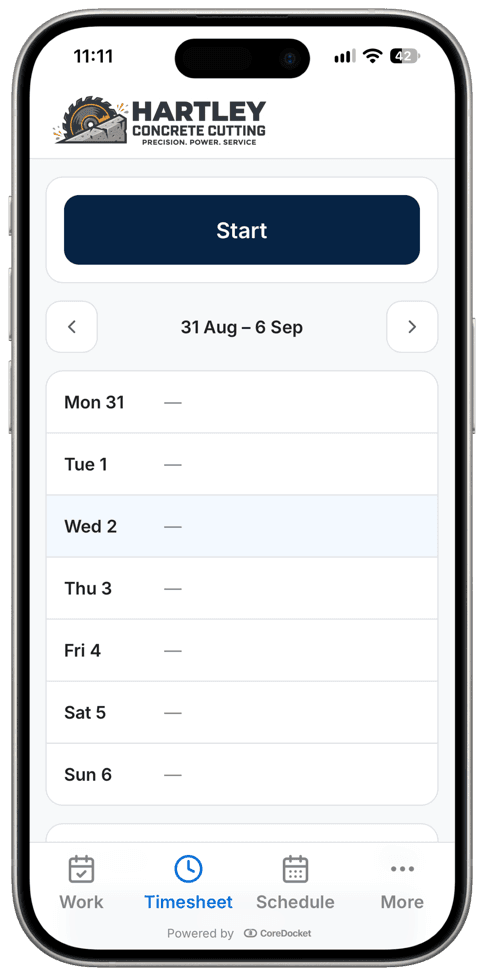
Two taps a day on their phone. Total hours calculated automatically, approved by the office, and ready for payroll.
This week
Approved- Mon06:30 – 15:008h 30m
- Tue06:30 – 14:458h 15m
- Wed06:00 – 11:00, 13:30 – 16:308h
- ThuAnnual leave
- Fri06:30 – 12:005h 30m
Two taps: Start and Stop
The crew clocks on in the morning and off at knock-off. Split shifts and broken days are handled automatically without complex menus.
Payroll-ready in one click
The office reviews the week, clicks Approve and downloads a payroll file for the bookkeeper. No re-typing hours on Monday morning.
Leave requests handled on phone
Crew request sick leave or RDOs on their phone. Once approved, it lands on their timesheet without anyone writing it down twice.
Safety and SWMS on every phone.
Digital SWMS, JSA, and Take 5s. Signed on the phone, version-controlled, and ready for any site safety audit.
Always the current version
Update your silica or cutting procedure once. The crew are prompted to re-sign the new version before their next job.
Sign-on before work begins
Set rules so operators must complete their safety sign-on before they can start a docket. No missing signatures.
One-click safety pack for builders
Generate a clean PDF with site rules, signed SWMS, and risk assessments to hand straight to the head contractor.
2-minute Take 5s & toolbox talks
Quick pre-task hazard checks and team talks completed on the phone with attendee signatures attached.
Track every saw, rig, and van.
Know who has what gear, where it’s working, and when it’s due for a service, and all in one central register.
Know who has each tool
Every saw, core drill, and power pack is assigned to a crew, a ute, or the yard. No ringing around on Monday to find missing gear.
Services trigger on machine hours
Engine hours and kilometres update automatically from morning pre-starts. Service alerts trigger on actual machine wear—not calendar guesswork.
Plant risk assessments on hand
PRAs, electrical test tags, rego, and service history are linked to each machine and viewable on screen at the site gate.
Your brand on every screen.
Looks like your own company app
Your logo and company name sit at the top of the office screen and the crew's phone. To your team and the builder, it’s your system.
Your letterhead on every docket
The signed docket on site and the PDF in their inbox are on your letterhead, with your logo and your business details.
Included free ... not a paid extra ... $0
Send us your logo. We set up your branding, letterhead, and rate cards before your first job at no extra charge.
Xero, MYOB, QuickBooks & more
The docket is signed on site, the invoice appears in your accounting software, and your bookkeeper works where they already work.
Invoices created with docket attached
Invoices go straight into your accounting software, and in Xero the signed PDF docket is attached as proof.
Quotes turn into booked jobs
When a customer approves an online quote, it turns into a scheduled job. The crew's docket starts with the quoted rates already loaded.
Your data stored in Australia
Hosted in Sydney and backed up in Australia. Encrypted, and kept separate from every other business.
On something else? Tell us what you use and we will add it.
Try it free. We'll help you roll it out.
Send us your rate sheet and logo. We configure your pricing matrix, create your letterhead, and get your first crew running, all 100% free for a month.
Civil, drilling, or profiling? If you price by the metre and need signed site dockets, tell us how you price a job and we'll set it up.
Free for a month. No credit card, and we load your price list for you.